Student Course Experience (SCE) Survey
Effective Fall 2022, the Student Course Experience (SCE) survey replaces the Student Observation of Faculty Instruction (SOFI) survey.
In a web browser, students should visit their myGeneseo portal, then select KnightWeb, Surveys, then SCE (formerly SOFI) Surveys.
seaborn Transparency with alpha
alpha helps address many data points on the same location.alpha to number between 0 and 1.import seaborn as snsdf_tips = sns.load_dataset('tips')sns.scatterplot(x = 'total_bill', y = 'tip', hue = 'smoker', alpha = .25, data = df_tips)
sns.lmplot(x = 'total_bill', y = 'tip', scatter_kws = {'alpha' : 0.2}, data = df_tips)
R programming
The R language is available as a free download from the R Project website at:
RStudio
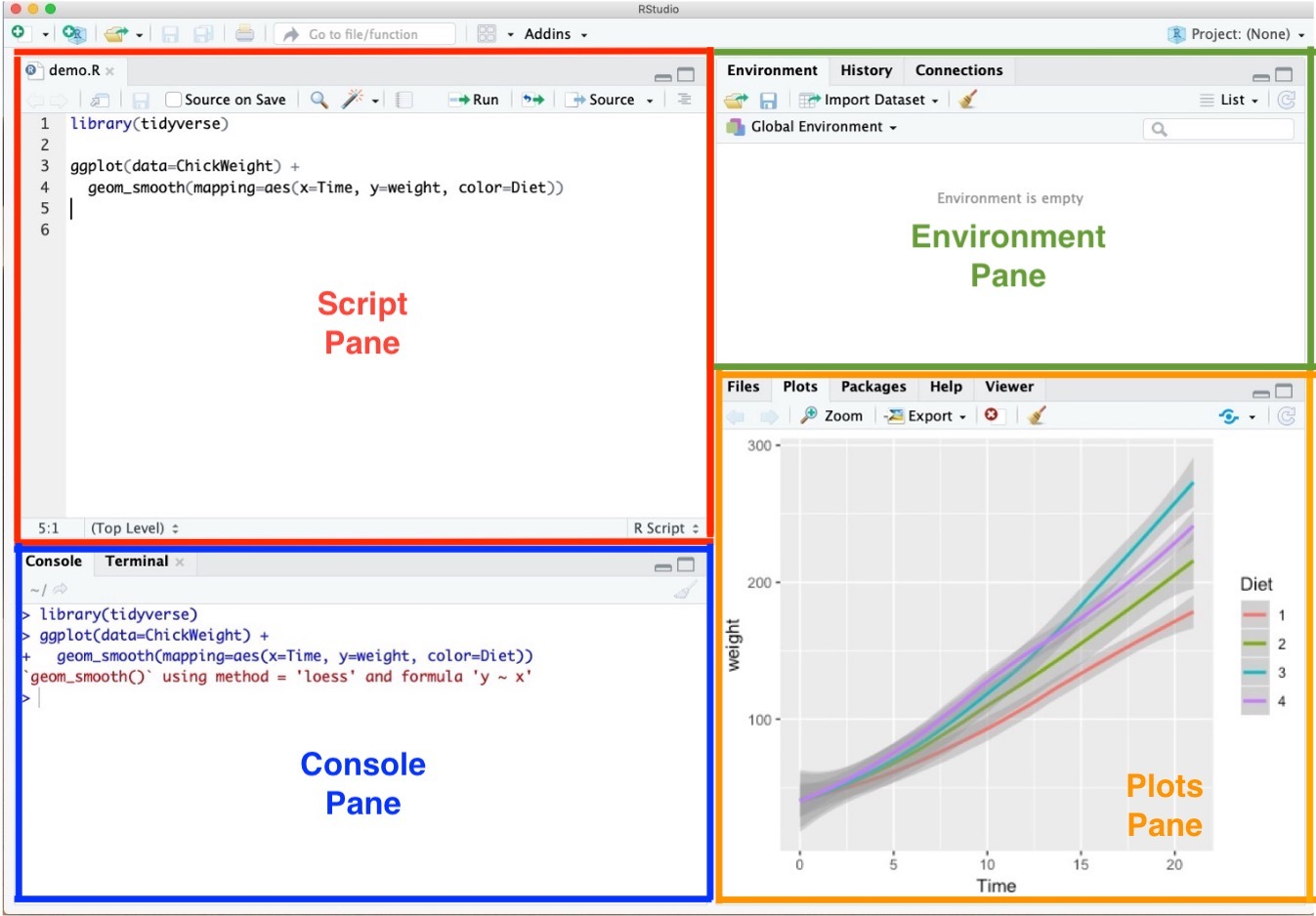
RStudio offers a graphical interface to assist in creating R code:
RStudio Environment

RStudio Environment

RStudio Environment

RStudio Environment

R Packages
pkgs <- c("ggplot2", "readr", "dplyr")install.packages(pkgs)
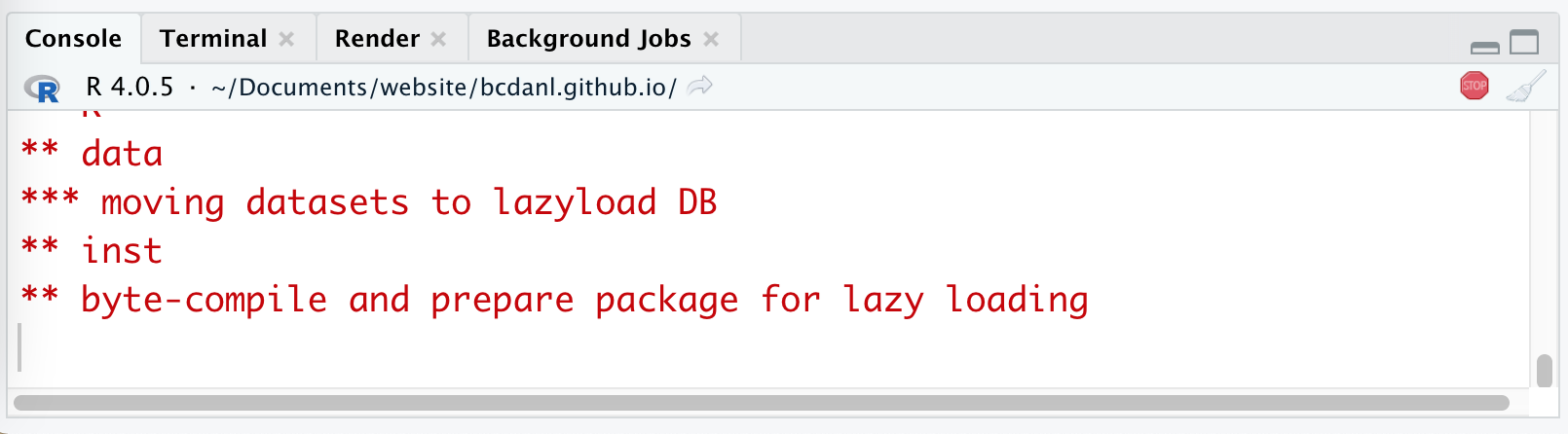
Mac: "Do you want to install from sources the packages which need compilation?" from Console Pane.
Windows: "Would you like to use a personal library instead?" from Pop-up message.
R Packages
ggplot2 is installed well:library(ggplot2) # loading the package tidyversempg # data.frame provided by the package ggplot2 # ggplot2 is included in tidyverse
Shortcuts for RStudio and RScript
Mac
<-.Windows
<-.Ctrl (command for Mac Users) + F is useful when finding a phrase (and replace the phrase) in the RScript.
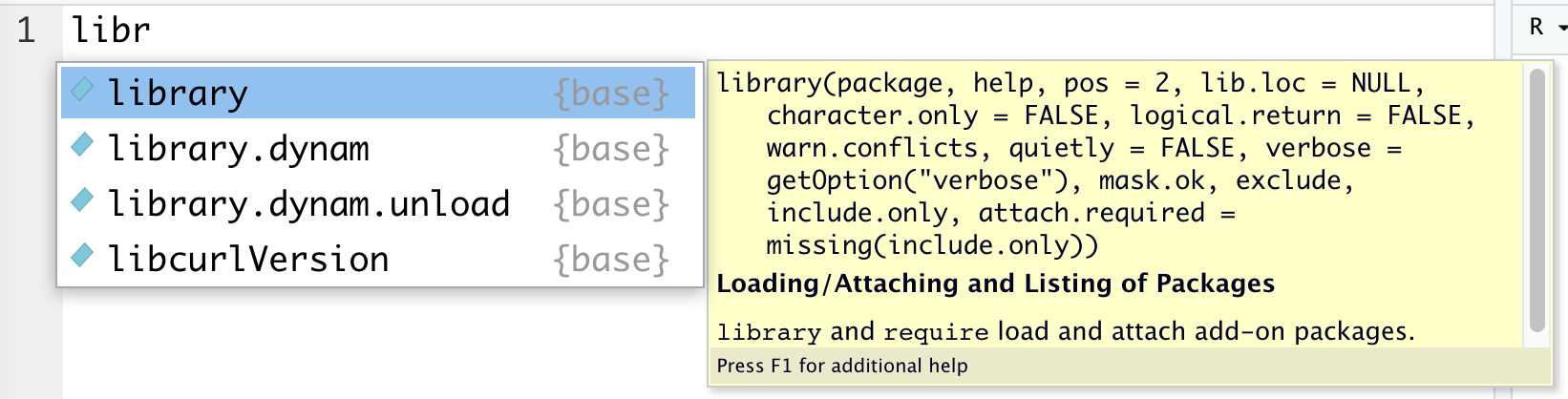
Auto-completion of command is useful.
libr in the RScript in RStudio and wait for a second.libr

PACKAGE, use install.packages("PACKAGE").install.packages("ggplot2") # installing package "ggplot2"

Quotation marks, parentheses, and +
+:> x <- "hello
+ tells you that R is waiting for more input; it doesn’t think you’re done yet. RStudio Options Setting

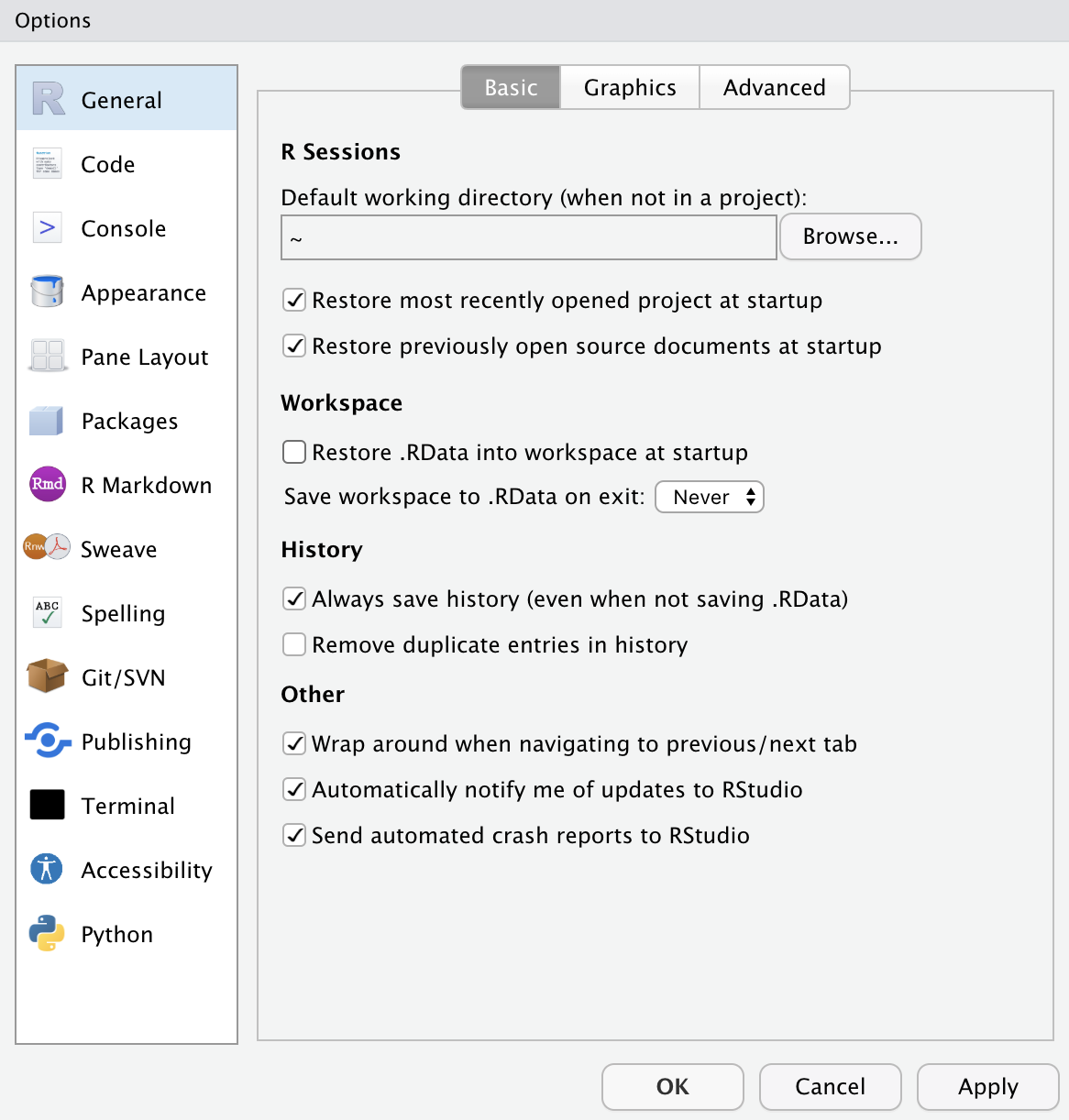
This option menu is found by menus as follows:
Check as in the picture.
Let's try a few commands to help you become familiar with R and its basic data types.
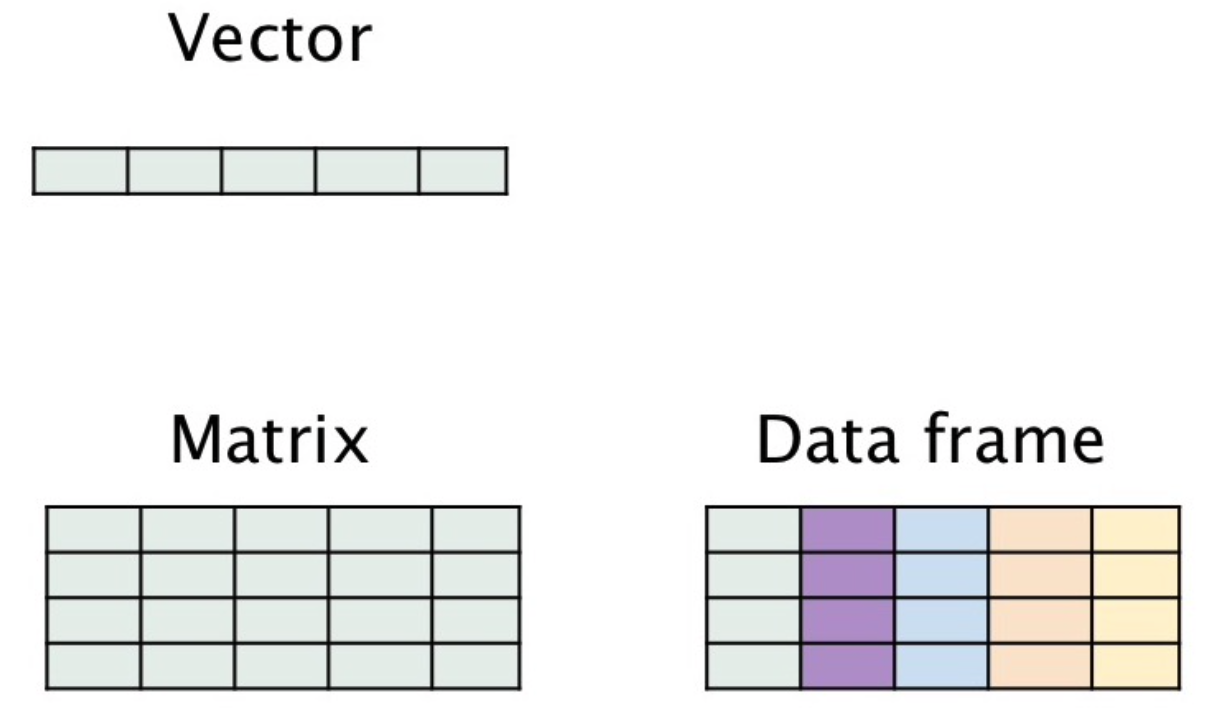
In R, vectors are arrays of same-typed values.
c() notation.11/2'Joe'"Joe""Joe"=='Joe'c()is.null(c())is.null(5)
c(1)c(1, 2)c("Apple", 'Orange')length(c(1, 2))vec <- c(1, 2)vec
Assignment
<-, =, -> ).<-.x <- 2x < - 3print(x)x <- 5x = 55 -> xClass Exercise 1
Create a new R script.
Enter the following code into your script.
variable2 <- c(12, 1, 10, 2, 18, 3)variable2mean(variable2)variable2 + 2
Run your code (Ctrl + Enter for Windows users; cmd + Return for mac users).
Save your code.
R variables and data types
Variables can be thought of as a labelled container used to store information.
Variables allow us to recall saved information to later use in calculations.
Variables can store many different things in RStudio, from single values, data frames, to graphs.
R variables and data types


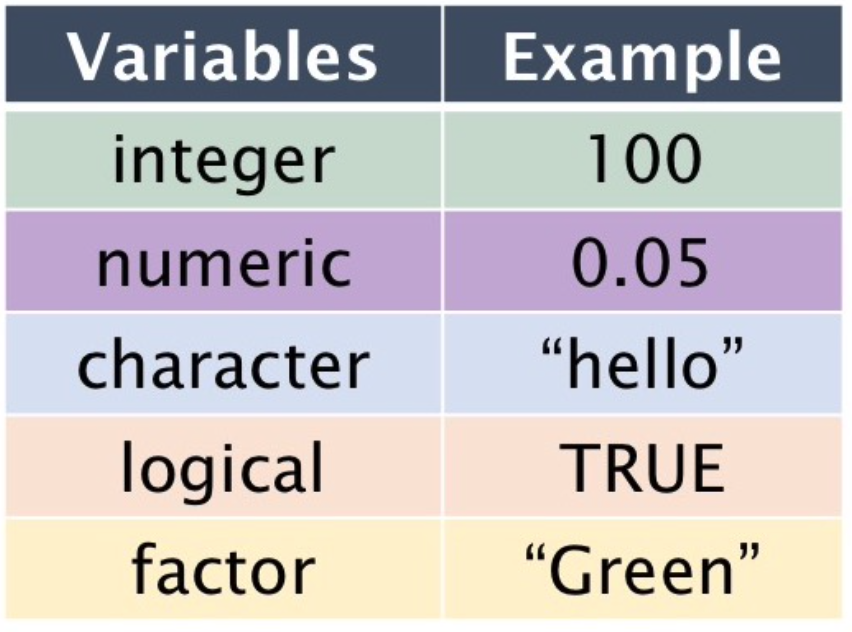
myname <- "my_name"class(myname)class() function returns the data type of an object.favourite.integer <- as.integer(2)print(favourite.integer)class(favourite.integer)favourite.numeric <- as.numeric(8.8)print(favourite.numeric)class(favourite.numeric)pvalue.threshold <- 0.05== to test for equality in Rclass(TRUE)favourite.numeric == 8.8favourite.numeric == 9.91:102*(1:10)seq(0, 10, 2)myvector <- 1:10myvectorb <- c(3,4,5)b^2beers <- c("BUD LIGHT", "BUSCH LIGHT", "COORS LIGHT", "MILLER LITE", "NATURAL LIGHT")beersFactors store categorical data.
Under the hood, factors are actually integers that have a string label attached to each unique integer.
beers <- as.factor(beers)class(beers)levels(beers)nlevels(beers)NULL and NA values
NULL is just an alias for c(), the empty vector.NA indicates missing or unavailable data.c(c(), 1, NULL)c("a", NA, "c")NULL and NA values
NULL is just an alias for c(), the empty vector.NA indicates missing or unavailable data.c(c(), 1, NULL)c("a", NA, "c")Code and comment style
The two main principles for coding and managing data are:
So we do make comments on codes.
Code and comment style
The # mark is R's comment character.
# indicates that the rest of the line is to be ignored.Consider using block commenting for separating code sections.
##### defines a coding block.Break down long lines and long algebraic expressions.
Finding the path name of the file
\) with double-backslash(\\) in the path name.\) with slash(/) in the path name.\) with double-backslash(\\) in the path name.\) with slash(/) in the path name.Step 0. Download the zip file, 'car_data.zip' from the Files section in our Canvas.
Step 1. Find the path name for the file, car.data.csv.
Step 2. In the code below, replace 'PATH_NAME_FOR_THE_FILE_car.data.csv' with the path name for the file, car.data.csv.
Step 3. Run the following R code:
# install.packages("readr")library(readr)uciCar <- read_csv( 'PATH_NAME_FOR_THE_FILE_car.data.csv')View(uciCar)Examining data frame
class() tells you what kind of R object you have. dim() shows how many rows and columns are in the data for data.frame.head() shows the top few rows of the data.help() provides the documentation for a class. help(class(uciCar)).str() gives us the structure for an object.Examining data frame
summary() provides a summary of almost any R object. skimr::skim() provides a more detailed summary.skimr is the package that provides the function skim().print() prints all the data. View() displays the data in a simple spreadsheet-like grid viewer.dplyr::glimpse() displays brief information about the data.Examining data frame
print(uciCar)class(uciCar)dim(uciCar)head(uciCar)help(class(uciCar))str(uciCar)summary(uciCar)library(skimr)skim(uciCar)library(tidyverse)glimpse(uciCar)Reading data from an URL
# install.packages("readr")# library(readr)tvshows <- read_csv( 'https://bcdanl.github.io/data/tvshows.csv')Accessing Subsets
head() returns the first N rows of our data frame.tail() returns the last N rows of our data frame.head(tvshows, n = 3)head(tvshows, 3)tail(tvshows, 3)tvshows[ 1:3, ]tvshows[ c(1, 2, 3), ]tvshows[ c(1, 2, 3), 1]tvshows$Networktvshows[, 2]tvshows[, "Network"]tvshows[ , c("Show", "GRP")]tvshows[1:3, c(2,5)]Genre is Reality.tvshows[ tvshows$Genre == "Reality", ]which() function. - This returns the TRUE indices of a logical object.reality <- which(tvshows$Genre == "Reality")realitytvshows[ reality, ]tvshows[tvshows$PE > 80, ]which() function. - This returns the TRUE indices of a logical object.reality <- which(tvshows$Genre == "Reality")realitytvshows[ reality, ]Class Exercises 2
Return those shows whose Duration values are 30.
Return those shows whose GRP values are greater than the mean value of GRP.
Return the data.frame with only three variables---Show, PE, and GRP---for which PE values are greater than the mean value of PE.
Data visualization
ggplot():# install.packages("ggplot2")library(ggplot2)ggplot( data = tvshows ) + geom_point( aes( x = GRP, y = PE, color = Genre ) )ggplot( data = tvshows ) + geom_point( aes( x = GRP, y = PE, color = Genre ) ) + geom_smooth( aes( x = GRP, y = PE, color = Genre ), method = lm )
GRP) and audience engagement (PE)?Student Course Experience (SCE) Survey
Effective Fall 2022, the Student Course Experience (SCE) survey replaces the Student Observation of Faculty Instruction (SOFI) survey.
In a web browser, students should visit their myGeneseo portal, then select KnightWeb, Surveys, then SCE (formerly SOFI) Surveys.
Keyboard shortcuts
| ↑, ←, Pg Up, k | Go to previous slide |
| ↓, →, Pg Dn, Space, j | Go to next slide |
| Home | Go to first slide |
| End | Go to last slide |
| Number + Return | Go to specific slide |
| b / m / f | Toggle blackout / mirrored / fullscreen mode |
| c | Clone slideshow |
| p | Toggle presenter mode |
| t | Restart the presentation timer |
| ?, h | Toggle this help |
| o | Tile View: Overview of Slides |
| Esc | Back to slideshow |
Student Course Experience (SCE) Survey
Effective Fall 2022, the Student Course Experience (SCE) survey replaces the Student Observation of Faculty Instruction (SOFI) survey.
In a web browser, students should visit their myGeneseo portal, then select KnightWeb, Surveys, then SCE (formerly SOFI) Surveys.
seaborn Transparency with alpha
alpha helps address many data points on the same location.alpha to number between 0 and 1.import seaborn as snsdf_tips = sns.load_dataset('tips')sns.scatterplot(x = 'total_bill', y = 'tip', hue = 'smoker', alpha = .25, data = df_tips)
sns.lmplot(x = 'total_bill', y = 'tip', scatter_kws = {'alpha' : 0.2}, data = df_tips)
R programming
The R language is available as a free download from the R Project website at:
RStudio
RStudio offers a graphical interface to assist in creating R code:
RStudio Environment

RStudio Environment

RStudio Environment

RStudio Environment

R Packages
pkgs <- c("ggplot2", "readr", "dplyr")install.packages(pkgs)
Mac: "Do you want to install from sources the packages which need compilation?" from Console Pane.
Windows: "Would you like to use a personal library instead?" from Pop-up message.
R Packages
ggplot2 is installed well:library(ggplot2) # loading the package tidyversempg # data.frame provided by the package ggplot2 # ggplot2 is included in tidyverse
Shortcuts for RStudio and RScript
Mac
<-.Windows
<-.Ctrl (command for Mac Users) + F is useful when finding a phrase (and replace the phrase) in the RScript.
Auto-completion of command is useful.
libr in the RScript in RStudio and wait for a second.libr

PACKAGE, use install.packages("PACKAGE").install.packages("ggplot2") # installing package "ggplot2"

Quotation marks, parentheses, and +
+:> x <- "hello
+ tells you that R is waiting for more input; it doesn’t think you’re done yet. RStudio Options Setting

This option menu is found by menus as follows:
Check as in the picture.
Let's try a few commands to help you become familiar with R and its basic data types.
In R, vectors are arrays of same-typed values.
c() notation.11/2'Joe'"Joe""Joe"=='Joe'c()is.null(c())is.null(5)
c(1)c(1, 2)c("Apple", 'Orange')length(c(1, 2))vec <- c(1, 2)vec
Assignment
<-, =, -> ).<-.x <- 2x < - 3print(x)x <- 5x = 55 -> xClass Exercise 1
Create a new R script.
Enter the following code into your script.
variable2 <- c(12, 1, 10, 2, 18, 3)variable2mean(variable2)variable2 + 2
Run your code (Ctrl + Enter for Windows users; cmd + Return for mac users).
Save your code.
R variables and data types
Variables can be thought of as a labelled container used to store information.
Variables allow us to recall saved information to later use in calculations.
Variables can store many different things in RStudio, from single values, data frames, to graphs.
R variables and data types


myname <- "my_name"class(myname)class() function returns the data type of an object.favourite.integer <- as.integer(2)print(favourite.integer)class(favourite.integer)favourite.numeric <- as.numeric(8.8)print(favourite.numeric)class(favourite.numeric)pvalue.threshold <- 0.05== to test for equality in Rclass(TRUE)favourite.numeric == 8.8favourite.numeric == 9.91:102*(1:10)seq(0, 10, 2)myvector <- 1:10myvectorb <- c(3,4,5)b^2beers <- c("BUD LIGHT", "BUSCH LIGHT", "COORS LIGHT", "MILLER LITE", "NATURAL LIGHT")beersFactors store categorical data.
Under the hood, factors are actually integers that have a string label attached to each unique integer.
beers <- as.factor(beers)class(beers)levels(beers)nlevels(beers)NULL and NA values
NULL is just an alias for c(), the empty vector.NA indicates missing or unavailable data.c(c(), 1, NULL)c("a", NA, "c")NULL and NA values
NULL is just an alias for c(), the empty vector.NA indicates missing or unavailable data.c(c(), 1, NULL)c("a", NA, "c")Code and comment style
The two main principles for coding and managing data are:
So we do make comments on codes.
Code and comment style
The # mark is R's comment character.
# indicates that the rest of the line is to be ignored.Consider using block commenting for separating code sections.
##### defines a coding block.Break down long lines and long algebraic expressions.
Finding the path name of the file
\) with double-backslash(\\) in the path name.\) with slash(/) in the path name.\) with double-backslash(\\) in the path name.\) with slash(/) in the path name.Step 0. Download the zip file, 'car_data.zip' from the Files section in our Canvas.
Step 1. Find the path name for the file, car.data.csv.
Step 2. In the code below, replace 'PATH_NAME_FOR_THE_FILE_car.data.csv' with the path name for the file, car.data.csv.
Step 3. Run the following R code:
# install.packages("readr")library(readr)uciCar <- read_csv( 'PATH_NAME_FOR_THE_FILE_car.data.csv')View(uciCar)Examining data frame
class() tells you what kind of R object you have. dim() shows how many rows and columns are in the data for data.frame.head() shows the top few rows of the data.help() provides the documentation for a class. help(class(uciCar)).str() gives us the structure for an object.Examining data frame
summary() provides a summary of almost any R object. skimr::skim() provides a more detailed summary.skimr is the package that provides the function skim().print() prints all the data. View() displays the data in a simple spreadsheet-like grid viewer.dplyr::glimpse() displays brief information about the data.Examining data frame
print(uciCar)class(uciCar)dim(uciCar)head(uciCar)help(class(uciCar))str(uciCar)summary(uciCar)library(skimr)skim(uciCar)library(tidyverse)glimpse(uciCar)Reading data from an URL
# install.packages("readr")# library(readr)tvshows <- read_csv( 'https://bcdanl.github.io/data/tvshows.csv')Accessing Subsets
head() returns the first N rows of our data frame.tail() returns the last N rows of our data frame.head(tvshows, n = 3)head(tvshows, 3)tail(tvshows, 3)tvshows[ 1:3, ]tvshows[ c(1, 2, 3), ]tvshows[ c(1, 2, 3), 1]tvshows$Networktvshows[, 2]tvshows[, "Network"]tvshows[ , c("Show", "GRP")]tvshows[1:3, c(2,5)]Genre is Reality.tvshows[ tvshows$Genre == "Reality", ]which() function. - This returns the TRUE indices of a logical object.reality <- which(tvshows$Genre == "Reality")realitytvshows[ reality, ]tvshows[tvshows$PE > 80, ]which() function. - This returns the TRUE indices of a logical object.reality <- which(tvshows$Genre == "Reality")realitytvshows[ reality, ]Class Exercises 2
Return those shows whose Duration values are 30.
Return those shows whose GRP values are greater than the mean value of GRP.
Return the data.frame with only three variables---Show, PE, and GRP---for which PE values are greater than the mean value of PE.
Data visualization
ggplot():# install.packages("ggplot2")library(ggplot2)ggplot( data = tvshows ) + geom_point( aes( x = GRP, y = PE, color = Genre ) )ggplot( data = tvshows ) + geom_point( aes( x = GRP, y = PE, color = Genre ) ) + geom_smooth( aes( x = GRP, y = PE, color = Genre ), method = lm )
GRP) and audience engagement (PE)?