Lecture 6
DANL 100: Programming for Data Analytics
Byeong-Hak Choe
September 15, 2022
Announcement
Accounting Expo
- Are you interested in learning about Accounting, Consulting, Audit or Tax?
- Stop in for pizza and meet 20+ Firms (alumni and employers) from the Big 4, National Players and Regional firms!
- When? September 15th, 5:00 PM-7:00 PM
- Where? Ballroom
- Dress code? Business Casual
Workflow
Workflow
Shortcuts
F9 runs a current line (where the blinking cursor bar is) or selected lines.
Home/End moves the blinking cursor bar to the beginning/end of the line.
- Fn + / works too.
PgUp/PgDn moves the blinking cursor bar to the top/bottom line of the script on the screen.
- Fn + / works too.
Workflow
Shortcuts
Mac
- command + N opens a new script.
- command + 1 is the shortcut for #.
- command + 4 is the shortcut for block comment.
Windows
- Ctrl + N opens a new script.
- Ctrl + 1 is the shortcut for #.
- Ctrl + 4 is the shortcut for block comment.
Workflow
More Shortcuts
- Ctrl (command for Mac Users) + Z undoes the previous action.
- Ctrl (command for Mac Users) + Shift + Z redoes when undo is executed.
- Ctrl (command for Mac Users) + F is useful when finding a phrase in the script.
- Ctrl (command for Mac Users) + R is useful when replacing a specific phrase with something in the script.
- Ctrl (command for Mac Users) + D deletes a current line.
Workflow
Code and comment style
- The two main principles for coding and managing data are:
- Make things easier for your future self.
- Don't trust your future self.
- The
#mark is Spyder's comment character.- The
#character has many names:hash,sharp,pound, oroctothorpe. #indicates that the rest of the line is to be ignored.- Write comments before the line that you want the comment to apply to.
- The
- Consider using block commenting for separating code sections.
# %%defines a coding block in Spyder.
Numbers
Numbers
Let's look at the following Python’s simplest built-in data types in detail:
Booleans (which have the value
TrueorFalse)Integers (whole numbers such as
10and28)Floats (numbers with decimal points such as
3.141592, or sometimes exponents like1.0e8, which means one times ten to the eighth power, or100000000.0)
Numbers
Integer Operations
Python can be a simple calculator.
Here is a table of the math operators:
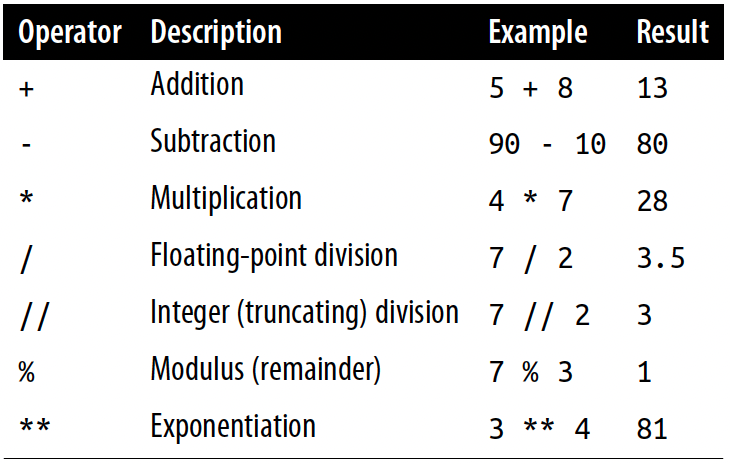
- Dividing by zero with either kind of division causes a Python exception
12 + 812 - 813 * 1.22 + 3 * 42 ** 32 / 02 // 0Numbers
Integers and Variables
- We can combine the arithmetic operators with assignment by putting the operator before the
=.
a = 72a -= 2 # This is like a = a - 2b = 62b += 2 # This is like b = b + 2c = 72c *= 2 # This is like c = c * 2d = 62d /= 2 # This is like d = d / 2Numbers
Type Conversions
To change other Python data types to an integer, use the
int()function.int()keeps the whole number and discard any fractional part.
TrueandFalseare converted to integer values1and0.
int(True)int(False)bool(1)bool(0)int(72.3)int(1.0e4)bool(1.0)bool(0.0)Numbers
Floats
- To convert other types to floats, we use the
float()function.
float(True)float(False)float(88)float('89')Numbers
Class Exercises
Multiply the number of seconds in a minute (
60) by the number of minutes in an hour (also60) using Python.Assign the result from the previous task (seconds in an hour) to a variable called
seconds_per_hour.How many seconds are in a day? Use your
seconds_per_hourvariable.Calculate seconds per day again, but this time save the result in a variable called
seconds_per_dayDivide
seconds_per_daybyseconds_per_hour. Use floating-point (/) division.
Choose with if
Choose with if
Compare with if, elif, and else
Now, we finally take our first step into the code structures that weave data into programs.
The following Python program checks the value of the boolean variable
disasterand prints an appropriate comment:
disaster = Trueif disaster: print("Woe!")else: print("Whee!")Choose with if
Compare with if, elif, and else
- The
ifandelselines are Python statements that check whether a condition is a booleanTruevalue, or can be evaluated asTrue.
disaster = Trueif disaster: print("Woe!")else: print("Whee!")Choose with if
Compare with if, elif, and else
Python expects you to be consistent with code within a section—the lines need to be indented the same amount, lined up on the left.
- The recommended style is to use four spaces.
- When changing a line by hitting the key enter/return, Spyder takes care of indention pretty well.
disaster = Trueif disaster: print("Woe!")else: print("Whee!")Choose with if
Compare with if, elif, and else
- We did a number of things here:
disaster = Trueif disaster: print("Woe!")else: print("Whee!")- Assigned the boolean value
Trueto the variable nameddisaster. - Performed a conditional comparison by using
ifandelse, executing different code depending on the value ofdisaster. - Called the
print()function to print some text.
Choose with if
Compare with if, elif, and else
- We can have tests within tests, as many levels deep as needed:
furry = Truelarge = Trueif furry: if large: print("It's a yeti.") else: print("It's a cat!")else: if large: print("It's a whale!") else: print("It's a human. Or a hairless cat.")Choose with if
Compare with if, elif, and else
- Indentation determines how the
ifandelsesections are paired.
furry = Truelarge = Trueif furry: if large: print("It's a yeti.") else: print("It's a cat!")else: if large: print("It's a whale!") else: print("It's a human. Or a hairless cat.")Choose with if
Compare with if, elif, and else
If there are more than two possibilities to test, use if for the first, elif (meaning else if) for the middle ones, and else for the last:
color = "mauve"if color == "red": print("It's a rasberry")elif color == "green": print("It's a green chili")elif color == "bee purple": print("I don't know what it is, but only bees can see it")else: print("I've never heard of the color", color)Choose with if
Comparison Operators
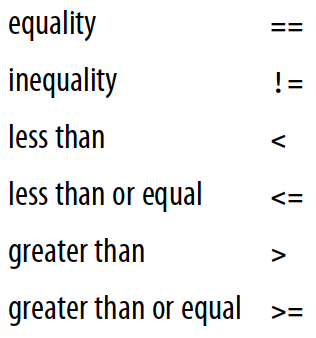
- Here are Python's comparison operators:
Choose with if
Comparison Operators
- Here are Python's comparison operators:
# Assign x to 7x = 7x == 5 # Test equalityx == 75 < xx < 10Choose with if
Comparison Operators
Logical operators have lower precedence than the chunks of code that they’re comparing.
- This means that the chunks are calculated first, and then compared.
5 < x and x < 10- The easiest way to avoid confusion about precedence is to add parentheses
(5 < x) and (x < 10)Choose with if
Comparison Operators
- Here are some other tests:
5 < x or x < 105 < x and x > 105 < x and not x > 10- If you’re
and-ing multiple comparisons with one variable, Python lets you do this:
5 < x < 10 # It’s the same as 5 < x and x < 10Choose with if
What Is True?
- What does Python consider
TrueandFalse?
- A
Falsevalue doesn’t necessarily need to explicitly be a booleanFalse.- The followings are all considered
False:
- The followings are all considered
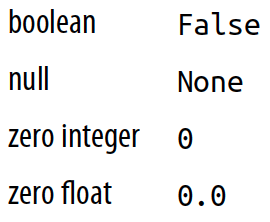
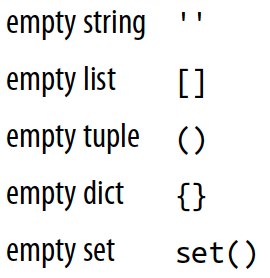
- Anything else is considered
True.
Choose with if
What Is True?
- Python programs use these definitions of "truthiness" and "falsiness" to check for empty data structures as well as
Falseconditions:
some_list = []if some_list: print("There's something in here")else: print("Hey, it's empty!")Choose with if
Do Multiple Comparisons with in
- Suppose that you have a letter and want to know whether it’s a vowel.
- One way would be to write a long
ifstatement:
- One way would be to write a long
letter = 'o'if letter == 'a' or letter == 'e' or letter == 'i' \ or letter == 'o' or letter == 'u': print(letter, 'is a vowel')else: print(letter, 'is not a vowel')Choose with if
Do Multiple Comparisons with in
- Whenever you need to make a lot of comparisons like that, separated by or, use Python’s membership operator
in, instead.
vowels = 'aeiou'letter = 'o'letter in vowelsif letter in vowels: print(letter, 'is a vowel')Choose with if
Do Multiple Comparisons with in
- Here are some examples of how to use
inwith some data types:
letter = 'o'vowel_set = {'a', 'e', 'i', 'o', 'u'}letter in vowel_setvowel_list = ['a', 'e', 'i', 'o', 'u']letter in vowel_listvowel_tuple = ('a', 'e', 'i', 'o', 'u')letter in vowel_tuplevowel_dict = {'a': 'apple', 'e': 'elephant', 'i': 'impala', 'o': 'ocelot', 'u': 'unicorn'}letter in vowel_dict- For the dictionary,
inlooks at the keys (the left-hand side of the:) instead of their values.
vowel_string = "aeiou"letter in vowel_stringChoose with if
Walrus Operator
- The walrus operator looks like this:

tweet_limit = 280tweet_string = "Blah" * 50diff = tweet_limit - len(tweet_string)if diff >= 0: print("A fitting tweet")else: print("Went over by", abs(diff))tweet_limit = 280tweet_string = "Blah" * 50if ( diff := tweet_limit - len(tweet_string) ) >= 0: print("A fitting tweet")else: print("Went over by", abs(diff))Choose with if
Class Exercises
Choose a number between 1 and 10 and assign it to the variable
secret. Then, select another number between 1 and 10 and assign it to the variableguess. Next, write the conditional tests (if,else, andelif) to print the string 'too low' ifguessis less thansecret, 'too high' if greater thansecret, and 'just right' if equal tosecret.Assign
TrueorFalseto the variablessmallandgreen. Write someif/elsestatements to print which of these matches those choices:cherry,pea,watermelon,pumpkin.